Every conversation reviewed Automatically.
Load your own products, policies, processes, and FAQs into the Simplexi Knowledge Base. The AI Agent answers every client query from your exact content — your language, your tone, your rules. Update it once and every AI response across every channel improves immediately.
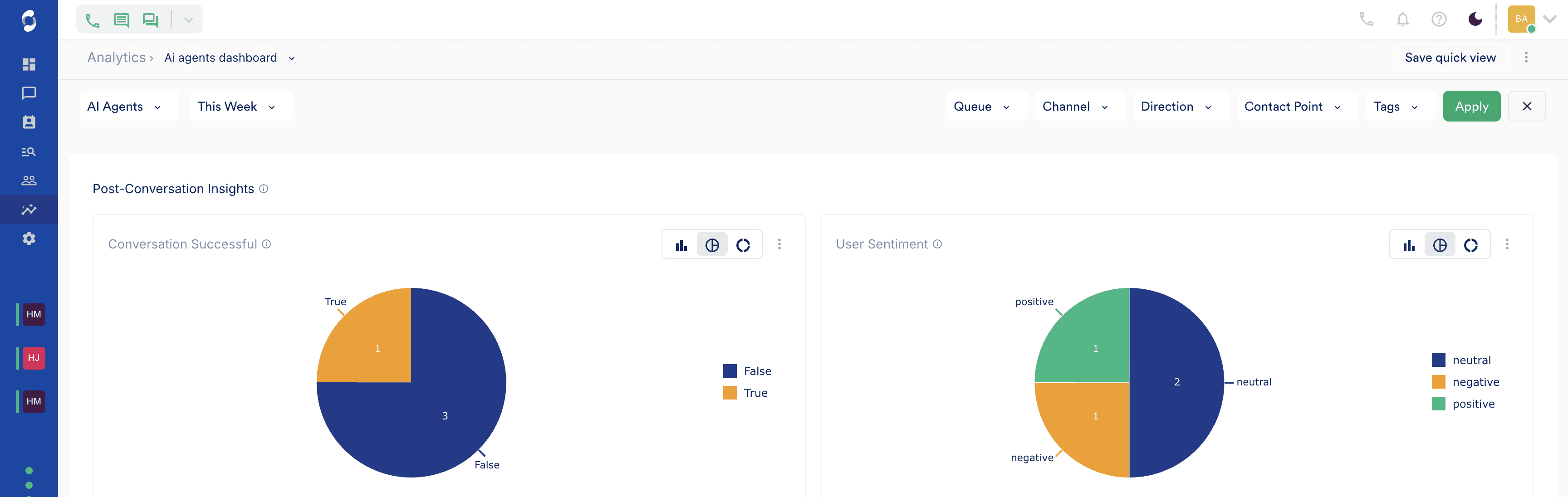
Everything you need to run post-conversation insights.
AI Conversation Summary
Clean summary generated after every call and message thread automatically.
Sentiment Scoring
Every conversation scored — Positive, Neutral, Frustrated, Negative.
Resolution Tracking
Resolved, Unresolved, or Escalated — tracked across every interaction.
At-Risk Client Detection
Clients likely to churn flagged before they go silent.
Agent Quality Scoring
AI scores agent performance against your criteria automatically.
Conversation Tags
Every conversation labelled by topic, outcome, and channel.
Filterable Insights
Filter by sentiment, agent, channel, date, or resolution status.
Export to CSV
One-click export for compliance, reporting, or deeper analysis.
How it works
From first touch to resolution — in clear steps.
Step 1 of 3
After every interaction — a score, a summary, a status. Automatically.
The moment a call ends or a message thread closes, Simplexi generates an AI summary, assigns a sentiment score, and records the resolution status. No manual review. No sampling. Every conversation accounted for.
0m 29s · Voice · ended via transfer_to_human: the user is asking about pricing tiers, but the provided context is a general overview, and does not contain enough detail to answer the user question about "what's up" with pricing tiers.
The user inquired about the company's pricing tiers after checking the website. The assistant was unable to provide a detailed answer and transferred the user to a human agent for further assistance.
Step 2 of 3
At-risk clients flagged before they leave.
Simplexi identifies clients whose recent interactions ended on a negative note and flags them for follow-up. Not after they have churned. Before they even consider it. The window to recover the relationship is still open.
Step 3 of 3
Your QA team reviews what matters. The AI reviews everything else.
Instead of manually sampling a small percentage of conversations, your QA team filters to exactly what needs attention — every unresolved conversation, every negative sentiment, every escalation. The AI has already done the review. Your team acts on the results.
Stop answering questions your system already knows.
Book a demo to see Simplexi in action.